
Nano Banana Pro Free Image Editor100+ Free Credits Powered by Gemini 3.0 Pro
Describe the edit you want and let Nano Banana Pro powered by Gemini 3.0 Pro deliver granular inpainting with precise, targeted results in seconds.
Fresh Nano Banana prompt receipts
Every tile here comes from our favorite community drops. Click through to study the creator or reuse the imagery as guardrails inside Banana Editor.
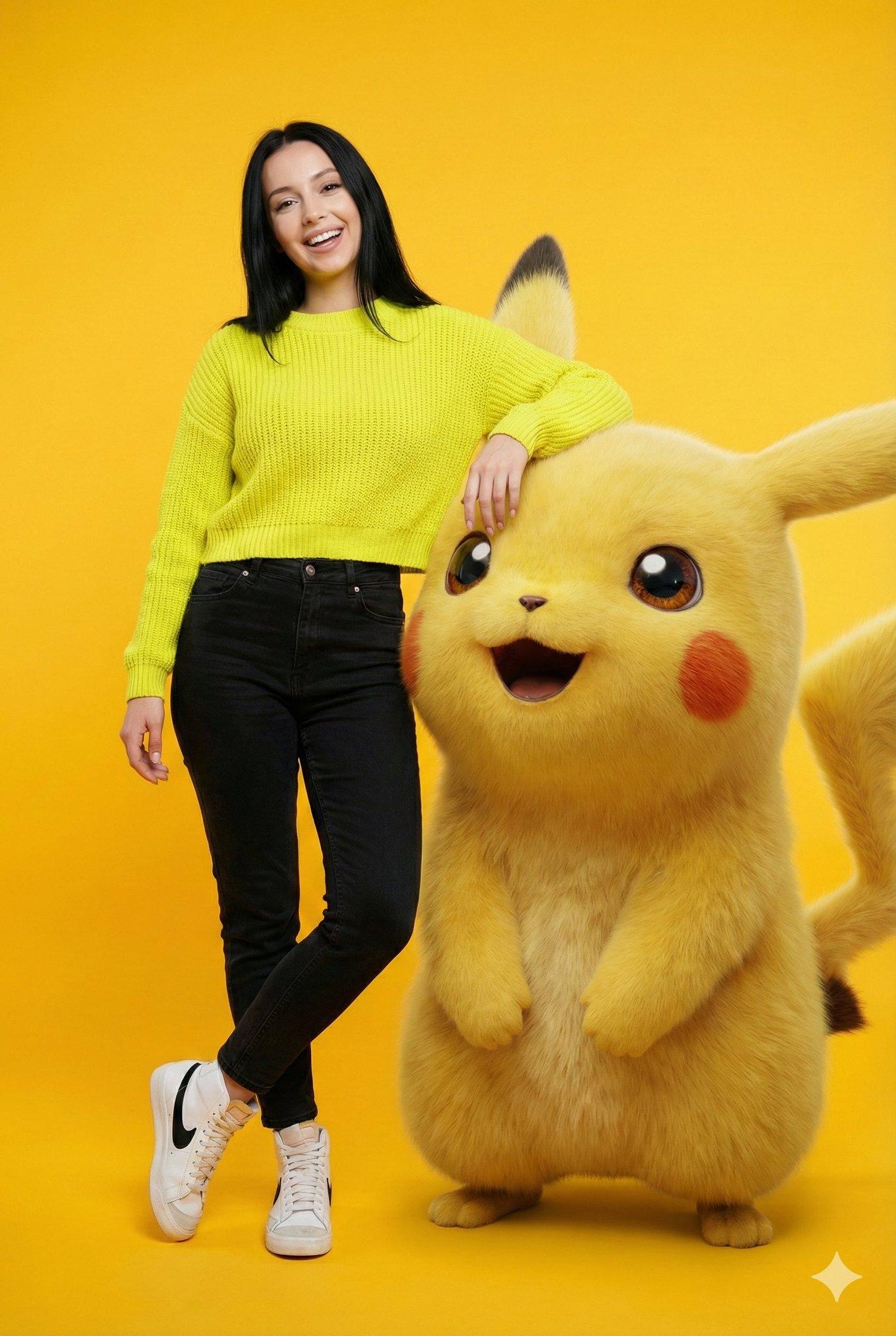
Childhood cartoon pose collage
Upload your photo and pose alongside giant 3D Tom & Jerry, Pikachu, Ben 10, or Pink Panther in matching themed outfits.

Christmas shoot: Cupid's arrow
Photoreal holiday portrait with a glossy red mechanical bow and a glowing red energy arrow, framed by a Christmas window scene.

Vogue cover identity lock
Face-identity-preserving Vogue cover portrait with paparazzi cameras and magazine layout.

Fireworks typography template
Renders any letters, numbers, or emojis as ultra-realistic fireworks in a cinematic night sky.

Y2K city collage magazine cover
Paper-cut street fashion cover; swap the city name to regenerate.

Chibi Christmas ornament desk
Festive bauble diorama that turns your likeness into a cute 3D character working at a holo desk inside a glass ornament.
Designed for every creative department
From campaign refreshes to film previz, Banana Editor applies granular inpainting to keep details intact.
Content & Social
Influencer and brand storytelling
- Lock talent identity across carousels with pixel-level control
- Swap backgrounds for seasonal drops in seconds
- Add props without reshoots via granular inpainting
- Deliver reels-ready lighting grades
Ecommerce & Catalog
Product imagery at scale
- Batch scene swaps for PDP refreshes with Gemini 3.0 Pro
- Update packaging and labels instantly
- Create colorways without new samples
- Generate platform-specific crops
Interiors & Architecture
Visualize redesigns and staging
- Rearrange furniture with consistency
- Change materials and finishes realistically with granular inpainting
- Extend rooms into widescreen hero shots
- Match day-to-night lighting moods
Film & VFX
Previsualization and lookdev
- Generate alternate camera angles
- Add atmospheric effects and FX passes
- Plan wardrobe or prop continuity with Gemini 3.0 Pro
- Create start/end frames for motion
How Banana Editor Works in 3 Guided Steps
Our AI-powered editor makes it incredibly easy to edit any photo with a simple text prompt. No design skills required.
Upload Image
Drop in a portrait, product, or scene
- Supports all major formats
- Batch upload multiple images
- No size limits
Describe Your Intent
Outline the edit, what to change, and what to preserve
- 1000+ font options
- Advanced text effects
- AI-powered positioning
Review and Download
Preview Nano Banana Pro output and export instantly
- High-resolution export
- Multiple format options
- Instant download
Free Tools • Powered by Gemini 3.0 Pro Creative Stack


Gemini 3.0 Pro Features Inside Banana Editor
Every control you need for granular inpainting and photoreal AI editing.
Identity Lock
Protect faces, products, and logo details with every Gemini 3.0 Pro prompt.
Scene Swap
Replace backgrounds and environments with lighting-aware renders and fast synthesis.
Prop & Wardrobe Swap
Add or change garments, accessories, and props with fabric-aware, pixel-level detail.
Lighting Direction
Dial time of day, rim lights, and color grade with generative lighting intelligence.
Prompt Templates
Use curated Gemini 3.0 Pro recipes for portraits, ecommerce, interiors, and VFX.
Quality Restore
Auto-fix artifacts after multi-turn edits with clarity, edge repair, and SynthID watermark auditing.
Nano Banana Pro Workflow Guidewith Gemini 3.0 Pro
Learn how to deliver granular inpainting and photoreal edits with Banana Editor and the Gemini 3.0 Pro (Nano Banana Pro) image editor.
Why Gemini 3.0 Pro Editing Belongs in Banana Editor
Banana Editor is the purpose-built workspace for the Gemini 3.0 Pro (Nano Banana Pro) image editor. Upload a portrait, product hero, or interior scene, describe the intent, and ship photoreal edits with granular control.
Identity lock, prompt templates, and quality restore combine to keep subjects stable, edges clean, and materials believable—exactly what creative directors expect from high-end retouching.
Whether you are swapping backgrounds, iterating wardrobe, or extending sets for storyboard beats, Banana Editor turns Gemini 3.0 Pro prompts into reliable, production-ready outputs.
Pixel Confidence
Faces, products, and logos stay consistent across every iteration thanks to granular inpainting.
Prompt Repeatability
Template recipes let teams reproduce winning edits on demand.
Fewer Reshoots
Refresh campaigns, catalogues, and storyboards without returning to set.
Ready to ship pixel-perfect edits with granular inpainting and Gemini 3.0 Pro?
Banana Editor Pricing
Choose your plan and start creating amazing AI images with Nano Banana.
Basic
Save 20%Perfect for individuals and light users
Includes
- 3600 credits, valid for 1 year
- 30-day history
- 4 running jobs at once
- Priority generation queue
- No watermark
- Private generations
- Commercial license
- Cancel anytime
Pro
Save 20%Ideal for creators and small teams
Everything in Basic, plus
- 8000 credits (4000 images), valid for 1 year
- 60-day history
- 4 running jobs at once
- Priority generation queue
- No watermark
- Private generations
- Commercial license
- Cancel anytime
Max
Save 15%Built for enterprises and professional teams
Everything in Pro, plus
- 22000 credits (11000 images), valid for 1 year
- 90-day history
- 4 running jobs at once
- Priority generation queue
- No watermark
- Private generations
- Commercial license
- Cancel anytime
Frequently Asked Questions
Have another question? Contact us on Discord or by email.
How does Banana Editor keep identities consistent?
We combine Gemini 3.0 Pro granular inpainting with reference locking and automated similarity checks on every edit.
Can I control what changes versus stays the same?
Yes. Prompt templates let you specify protected areas, and you can layer mask annotations for extra control over granular inpainting.
Which edits does Banana Editor handle best?
Portrait retouching, wardrobe swaps, background replacement, product relighting, interior redesign, and VFX previz with pixel-level precision.
Does quality degrade after multiple edits?
The quality restore pipeline repairs edges, boosts clarity, removes artifacts, and re-applies SynthID watermarking after each iteration.
Is Banana Editor available for teams?
Absolutely. Invite collaborators, share prompt presets, and monitor credit usage from one workspace.
What image formats are supported?
Upload JPG, PNG, or WEBP up to 10MB per image. Batch mode supports up to fourteen references at once.
Bring Gemini 3.0 Pro into your workflow
Launch Banana Editor to deliver granular inpainting and photoreal edits in minutes.